Now on Google Play · iPhone coming soon
Your pond's whole story, in your pocket
Log your water, keep a record of every koi, and never forget the pond chores — all in one app built for koi keepers.
Use KoiKeep in your browser · same account as the app14-day free trial · Explore a sample pond without an account
New · Works with UbiBot
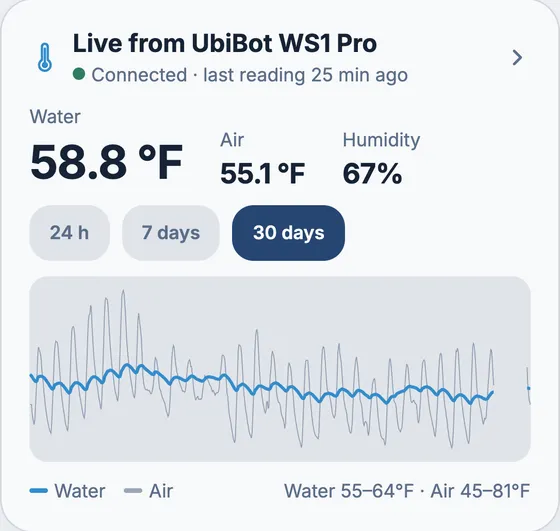
Your pond logs its own temperature
Connect a UbiBot WS1 or WS1 Pro with a water probe, and KoiKeep records your pond around the clock, so you see the whole day, not just the minute you happened to check. No more wading out with a thermometer.
- Water temperature, air temperature and humidity, checked every 15 minutes, with charts for 24 hours, 7 days and 30 days. Your last 30 days come in the moment you connect
- Alerts on your phone when the water gets too cold or too warm, swings fast in a day, or the device goes quiet. You set the limits
- Feeding advice and the pond's season follow the live water temperature, and one tap fills in the temperatures on a new water check
- Connects with a read-only key that can't change your device. KoiKeep keeps only the temperatures and humidity, and disconnecting deletes them
Set up in the phone app. UbiBot devices are sold separately; KoiKeep isn't affiliated with UbiBot.
New · Works with Seneye
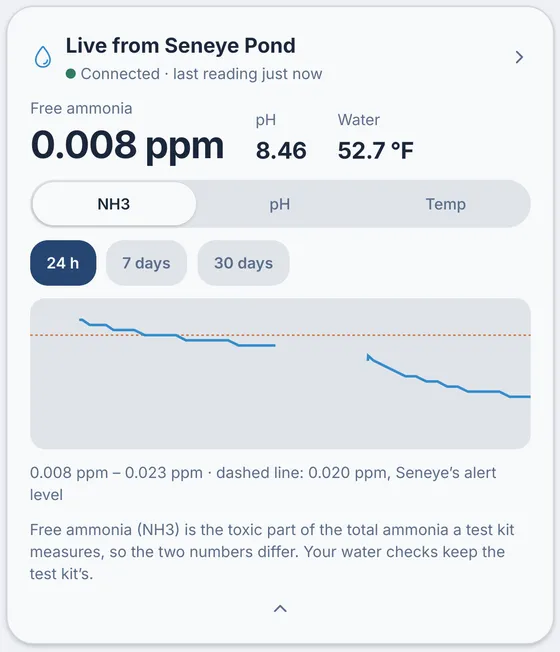
Ammonia and pH, measured around the clock
Connect a Seneye Pond with its Seneye Web Server, and KoiKeep logs free ammonia, pH and water temperature from inside the pond, so you see an ammonia rise when it starts, not at your next test.
- Free ammonia (NH3), pH and water temperature from every reading the Seneye Web Server sends, with charts for 24 hours, 7 days and 30 days
- Alerts on your phone when free ammonia reaches your limit, pH leaves your range, the Seneye is out of the water or needs a new slide, or it goes quiet
- Free ammonia is the toxic part of the total ammonia a test kit measures, so it's kept apart from your water checks. Have a UbiBot too? You pick which one the feeding advice and the pond's season use for temperature
- No Seneye password needed: your Seneye Web Server sends readings to KoiKeep with its own secret key. Disconnecting deletes the key and every reading
Set up in the phone app. Needs the Seneye Web Server (SWS). Seneye devices are sold separately; KoiKeep isn't affiliated with Seneye.
AI Koi Identifier
What variety is that koi?
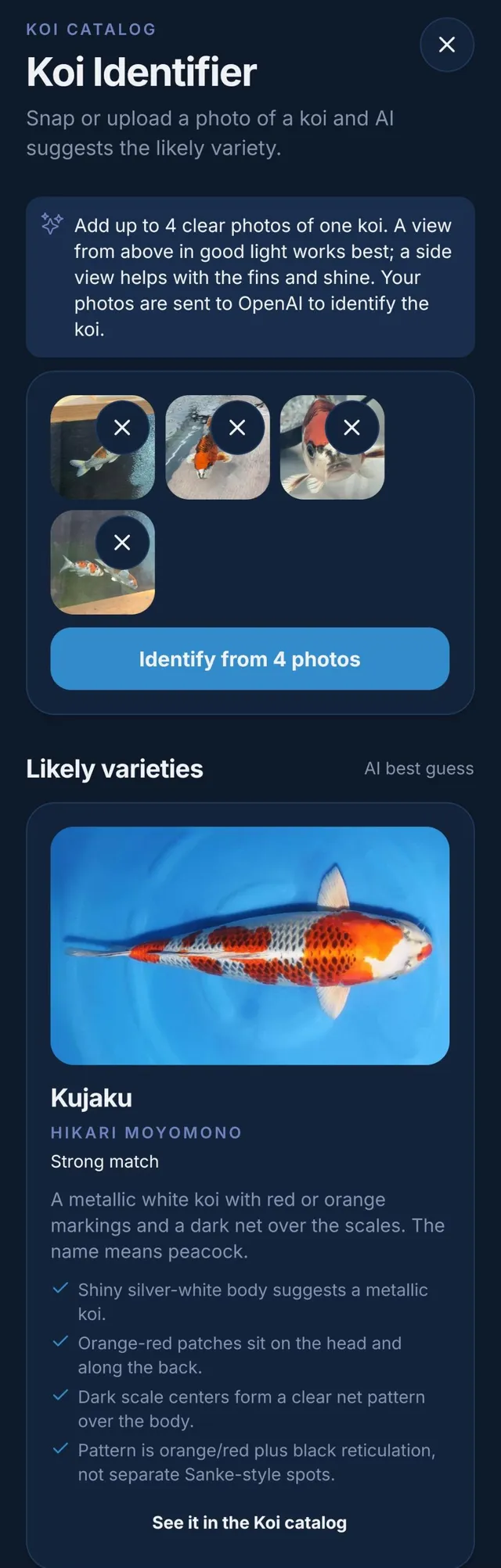
Snap a photo of a koi, at the dealer, at a show or in your own pond, and AI suggests the likely variety. Each suggestion comes with a reference photo and the reasons it fits, so you can see why, not just what.
- Add up to four photos of one koi. A view from above shows the pattern; a side view helps with the fins and shine
- It chooses from more than 60 varieties and says how sure it is: a strong, likely or possible match
- Check its answer: one tap opens Identify by Features with the shine, colours, pattern and scales it saw already picked, for you to confirm or change
- No photo, or would rather not use AI? Identify by Features asks a few quick questions about what you see instead, with no AI and no monthly limit
An AI best guess, not a certified identification: lineage and the finer points of a koi still take an expert's eye. For subscribers, with up to 15 identifications a month. Your photos are sent to OpenAI to be analysed and aren't saved; see the privacy policy.
Features
Everything your pond needs you to remember
Test kits, notebooks, phone photos and sticky notes on the fridge, all brought together. KoiKeep keeps the whole picture in one place, so you can spend less time keeping records and more time watching your fish.
See trends, not just numbers
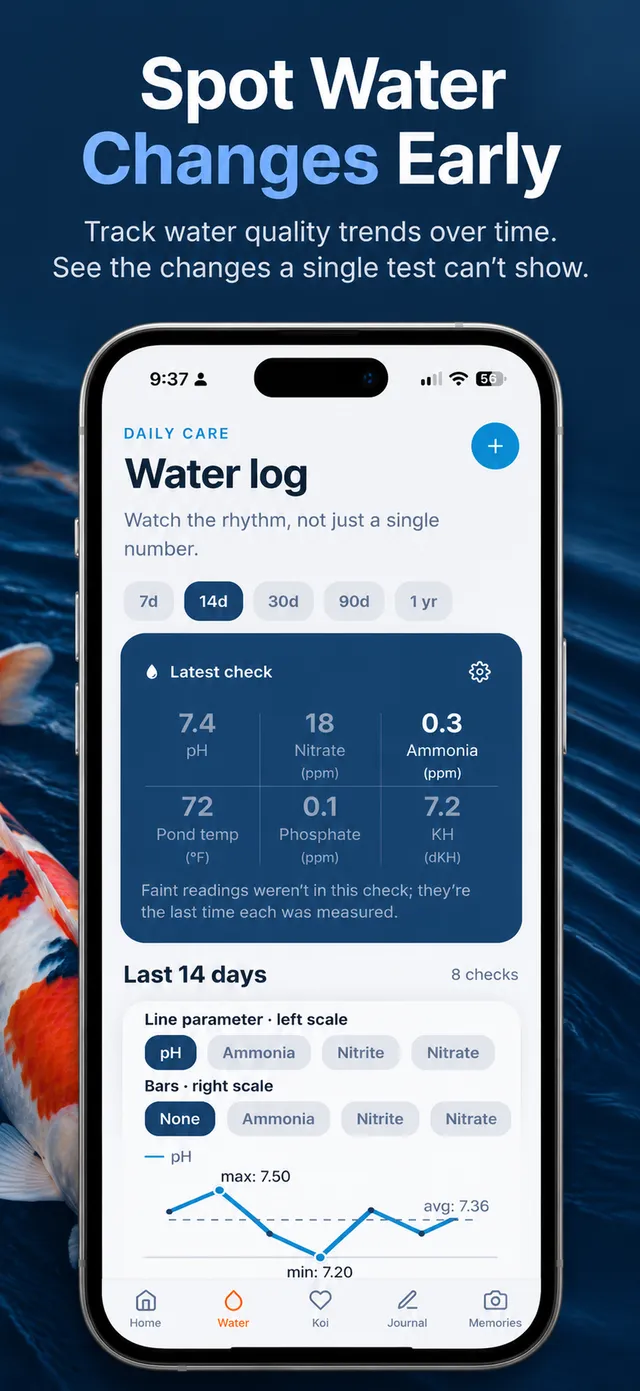
Log pH, ammonia, nitrite, nitrate, phosphate, KH, salinity, and water and outside temperature. A chart shows how each reading moves over time, so a slow drift gets noticed before it becomes a problem.
Know when you last tested
The Home screen shows how long it has been since your last water check. It gives you a nudge after a week and a clear warning after a month.
A record for every koi
Give each fish a profile with its variety, photos, a short video clip, birth and purchase dates, what you paid, and your notes. Keep a wish list of the koi you're still hunting for, too.
Routines that repeat themselves
Set reminders for water changes, filter cleaning, treatments and feeding changes. Repeat them every few days, weeks, months or years, colour-code them by category, and see what's due on the Home screen.
A journal with context
Write observations and attach them to the water test you took that day. Save pond photos and videos as memories, so you can look back on how your pond and your fish have grown.
Learn as you keep
Read care articles that cite their sources, look up koi terms in the glossary, and browse a variety catalog with photos from Genki Nishikigoi. The built-in calculators handle salt doses, pond volume, free ammonia and how much baking soda raises your KH.
How it works
From first test to full history
There's no long setup. Add your pond, log what you already test, and KoiKeep builds the history for you.
Try the sample pond
Open KoiKeep and explore a ready-made sample pond with readings, journal entries and memories. You don't need an account.
Add your pond
Sign up with email, Google or Apple and start your 14-day free trial with the App Store or Google Play. Then add your pond's name, size and location.
Log as you go
Record each water test, add your koi, and set reminders for your routines. Every entry adds to a history you can look back on.
Made for pondside use
Watch the rhythm, not just a single number
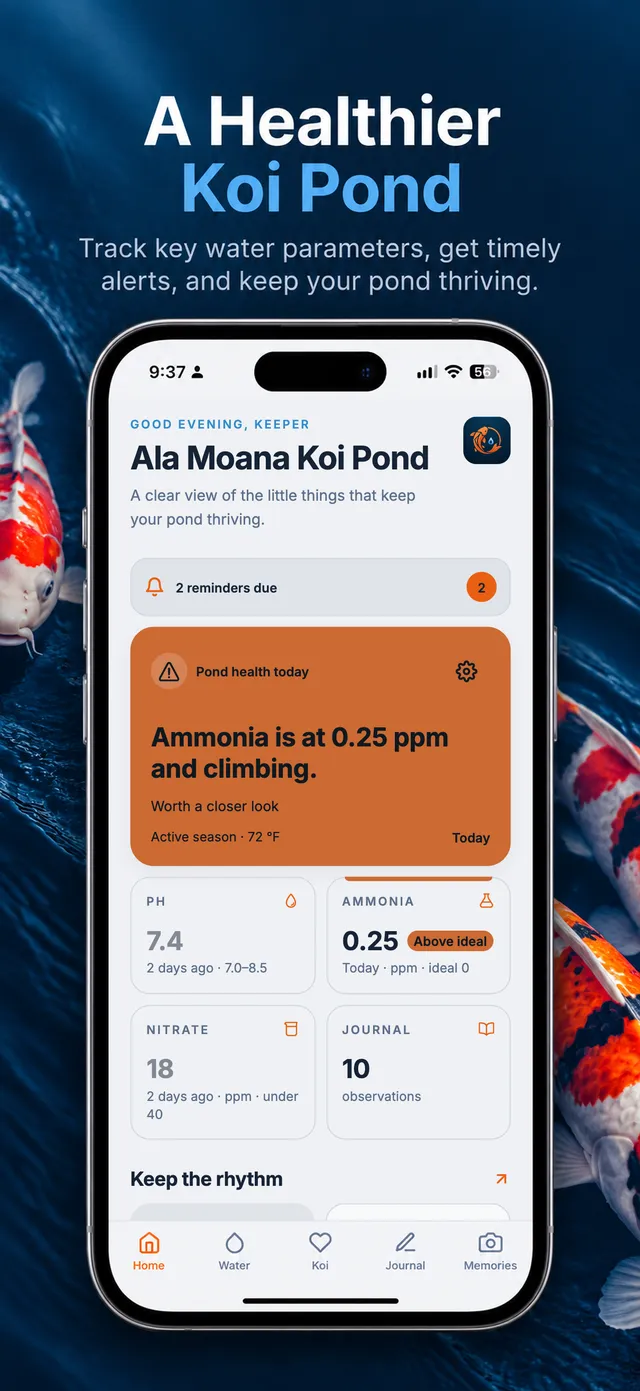
One reading tells you about today. A season of readings tells you how your pond really behaves. KoiKeep puts your latest results next to the trend, so you can see what's normal for your water and spot what isn't.
- Choose which readings appear on your Home screen and pond summary
- Fahrenheit or Celsius, gallons or litres, with more than one pond if you have them
- Light and dark mode, so it's easy on the eyes at dawn feeding or a late check
Your collection
Tracking your koi's growth
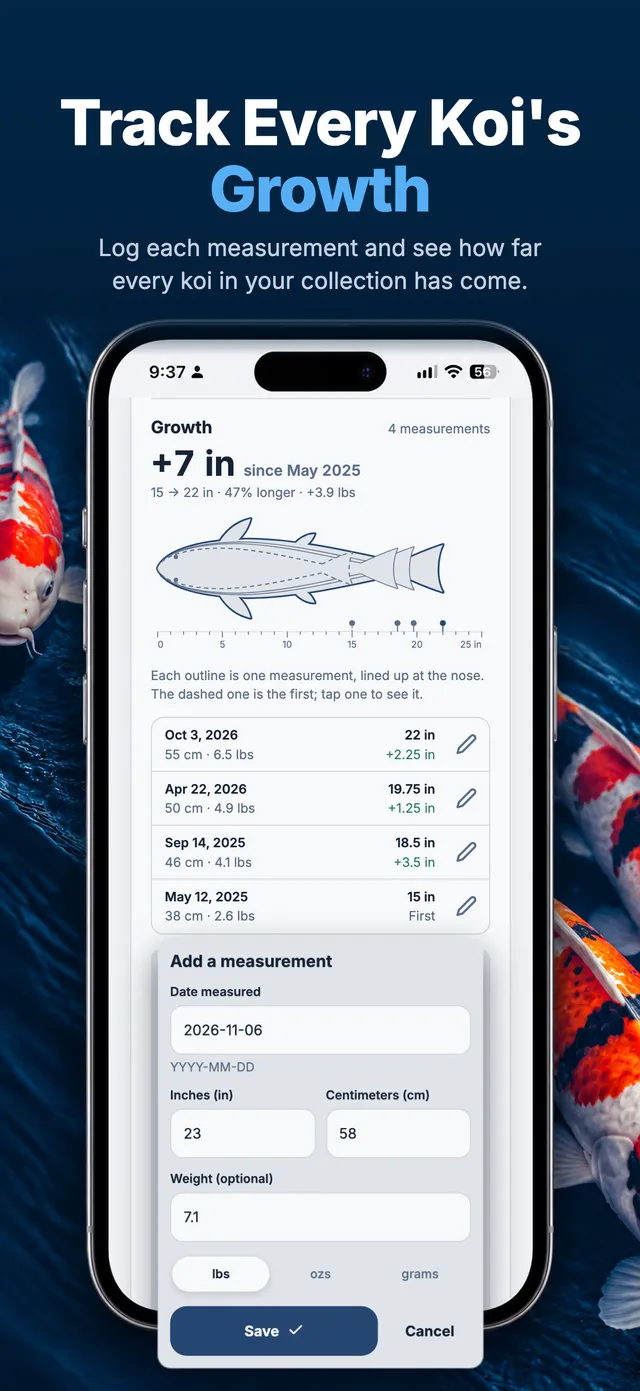
Every koi in your collection keeps its own growth record. Measure it whenever you net it, add the length and a weight if you have one, and KoiKeep draws each measurement as an outline lined up at the nose, so you can see at a glance how far each fish has come.
- Record length in inches or centimeters, with an optional weight in lbs, ozs or grams
- Add past measurements by the date they were taken, and edit or delete any of them later
- See the gain since the first measurement, the change between each one, and which koi grew most this year in your Koi report
Feeding
Feed for the water you have today
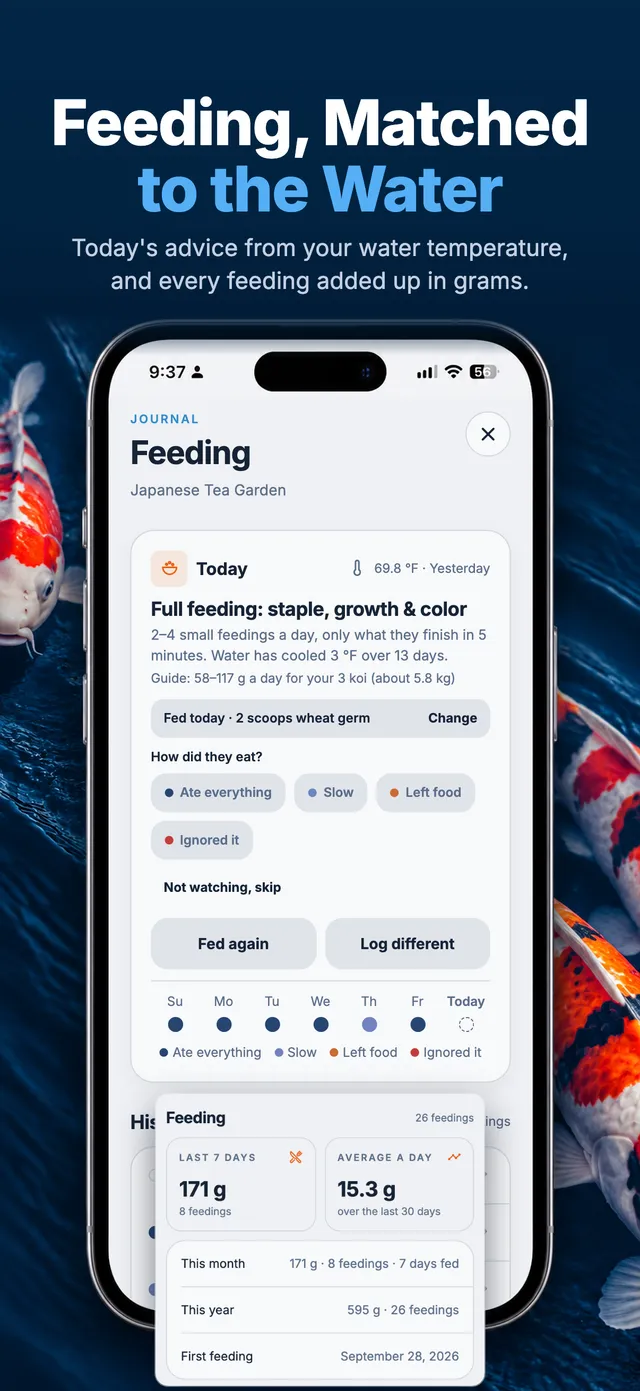
How much koi should eat depends on how warm the water is. KoiKeep reads your latest water temperature and tells you what today calls for, then keeps a simple log of what you fed and how the koi took it, so a change in appetite stands out before it becomes a worry.
- Today's advice comes from your latest water temperature, from rest in the cold to full feedings in summer, with a guide in grams for the koi you keep
- Log a feeding in one tap with “Fed as usual”, then note how the koi ate. The week shows as dots coloured by appetite, and a gentle warning appears when appetite drops
- Weigh your scoop once and the Journal report adds it all up in grams: the last 7 days, an average a day, totals by month and year, and by food
Spending reports
Know what your koi really cost
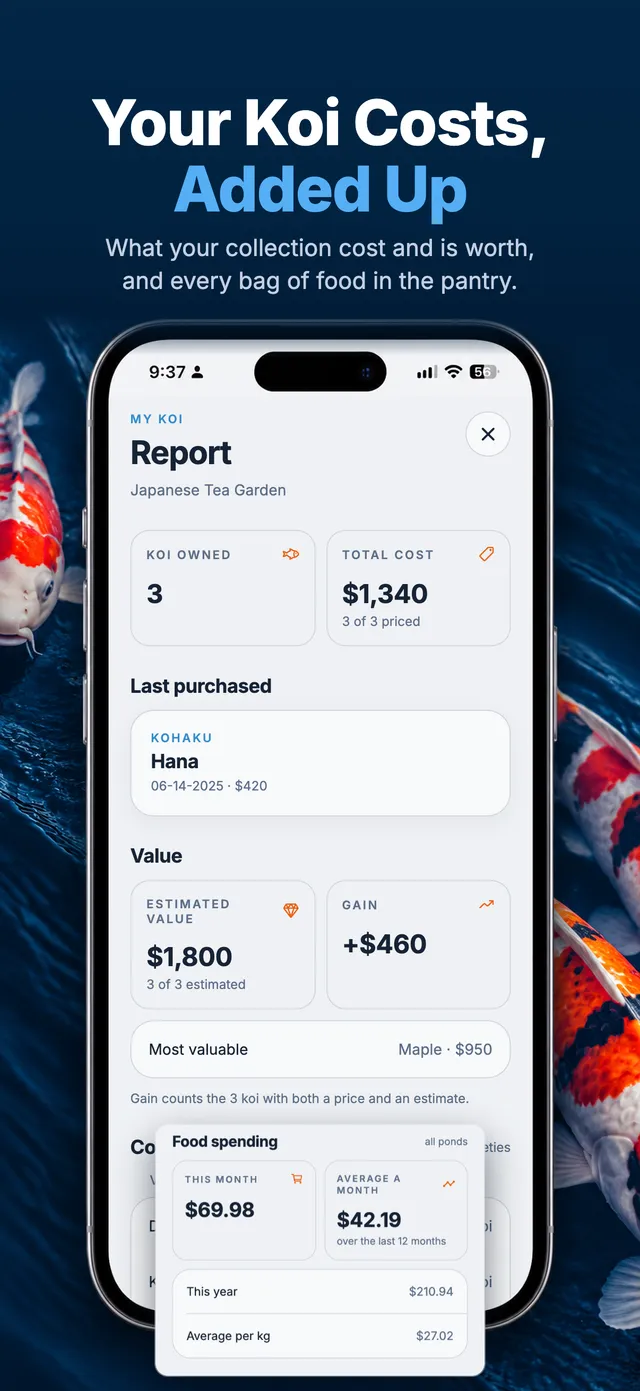
Koi keeping is a joy, and it adds up. KoiKeep keeps the numbers for you: what you paid for each koi and what your collection is worth, every bag of food from the day you buy it to the last scoop, and now every treatment in your medicine cabinet.
- The My Koi report adds up what your collection cost, what it's worth today and the gain, with your most valuable koi, purchases by year, and spending by breeder farm and dealer
- The Food Pantry tracks each bag of food: brand, size, cost and the day you opened it. It estimates what's left from the feedings you log, warns when a bag runs low, and nudges you when one has been open about three months
- Snap the bag and AI will Read the label to fill in the protein, fat, fiber and ash for you. The Journal report then shows your food spending this month, the average a month and the cost per kg
- The new Medicine Cabinet keeps your medications, water treatments and salt: what's left, when each expires, and a warning before one runs low or expires. Log doses from a journal entry, Read the label to fill in the details, and see your medicine spending in the Journal report
How much does KoiKeep cost?
New subscribers get a 14-day free trial, which you start by confirming with the App Store or Google Play after you create an account. Unless you cancel at least 24 hours before it ends, it then renews at $17.99 a year in the US, billed through the store. Local prices are shown in the store. You can explore the sample pond, the care articles and the calculators without an account at all.
Which devices are supported?
KoiKeep is on Google Play for Android phones now, and coming soon to iPhone. One account works on both, and in a web browser, so your records follow you if you switch phones.
Which water sensors work with KoiKeep?
Two kinds. The UbiBot WS1 and WS1 Pro, with a water temperature probe in the pond, connect with the device's channel ID and a read-only key from the UbiBot console. The Seneye Pond, with the Seneye Web Server, reads free ammonia, pH and water temperature: you turn on Local Data Exchange in the Seneye Web Server's settings, copy its secret key into KoiKeep, and paste the address KoiKeep gives you back into the Seneye Web Server. Neither needs your UbiBot or Seneye password. Each pond can have one of each, and you choose which one its water temperature comes from. You connect them in the phone app.
Can I track more than one pond?
Yes. Add as many ponds as you keep, each with its own water log, koi, journal, memories and reminders, and switch between them from the menu.
Who can see my koi and photos?
Only you. Your records are private to your account, and your photos and videos are kept in private storage that no other user can open. KoiKeep has no ads, and we never sell your data.
How is my data handled?
Your records are stored securely with our hosting provider and used only to run the app for you. The full details are in our Privacy Policy. You can delete your account and everything in it at any time, right inside the app. The data deletion page shows how.
How do I get help?
Visit the support page and email us. KoiKeep is made by an independent developer who reads every message.
Get KoiKeep on Google Play
Start your 14-day free trial and give your pond the record it deserves. The iPhone app is on its way to the App Store.
Use KoiKeep in your browser · same account as the app